Sign Up


What Exactly Are Toxic Backlinks?
First things first: the term toxic backlink didn’t originate from Google. It’s part real concern, part marketing ploy by third-party SEO tools, designed to stir up a little FUD (Fear, Uncertainty, and Doubt). The catch? Every tool defines this supposed toxicity differently, and many claim it’s their toxic backlinks tool that can detect them accurately.
“If you’re seeing individual links that pop up and you say, “Oh this looks like a spammer dropped the link” or whatever, I would completely ignore those […] because these spammy links happen to every website and Google’s system has seen them so many times over the years that we’re very good at just ignoring them.” — John Mueller, Search Advocate Google
With metrics swinging back and forth, changing every time you log into SEMrush, LinkResearchTools, or any other tool that measures backlink toxicity score, how can you tackle the issue when each one shows a different result? There’s no universal definition, so things can go awry really fast. From Google’s side, it doesn’t even use the word toxic. There are natural links and unnatural links, and that’s it.
Spammy vs. Manipulative vs. Toxic Links
With so much confusion around the terminology, lines can get blurry pretty fast. Here’s a quick breakdown to clear things up:
| Type | Definition | How They Look | Does Google Punish It? |
| Spammy Backlink | Low-quality, random links; spam backlink is autogenerated | Broken CMSs, random image hotlinks, old forum profiles, ancient comment spam | Usually ignores |
| Manipulative Backlink | Links built or bought explicitly to manipulate search rating | Private blog networks (PBNs), paid guest posts, link exchanges, so-called ‘editorial placements’ (a.k.a bought links) | Yes. It’s a big deal. |
| Toxic Backlink | Mostly just a marketing spin from SEO tools on spammy links | Flagged by tools, not Google. Varies depending on the tool | No |
If you want to dig a little deeper, check out this quick rundown of types of links Google actually flags, straight from their Link Spam documentation.
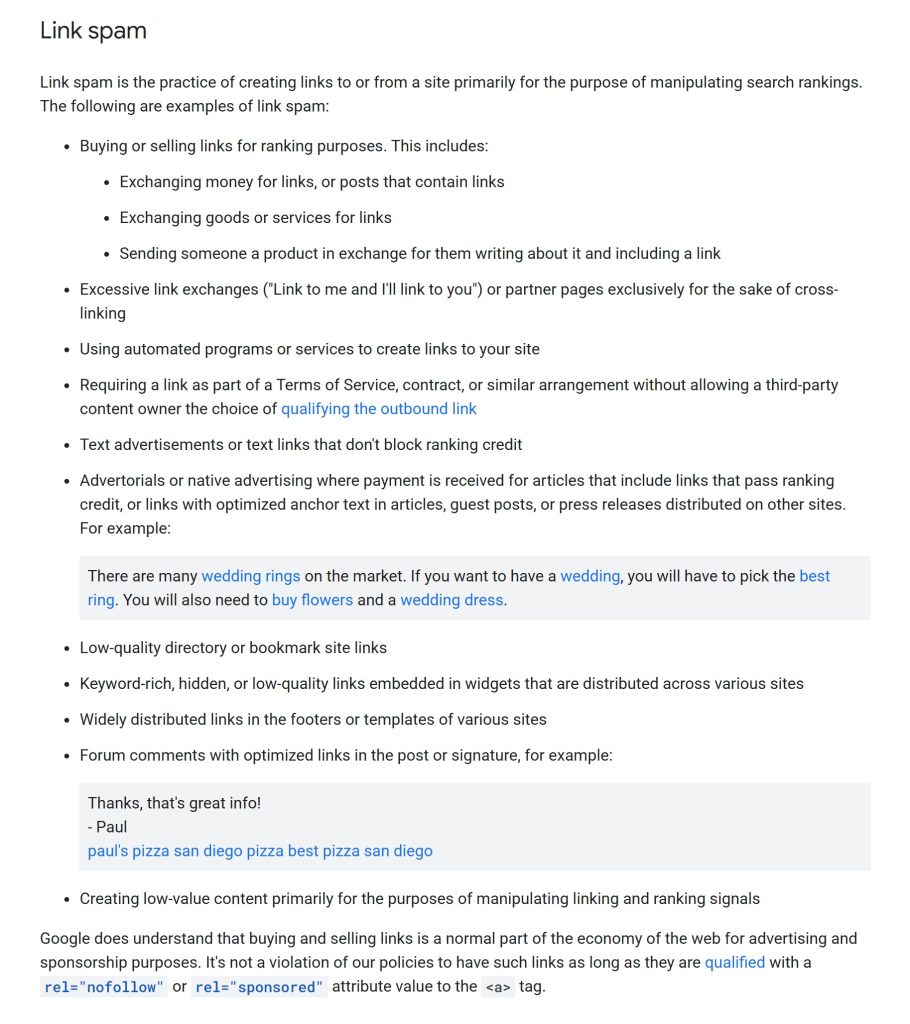
Ultimately, only manipulative links — the obvious schemes you’ve built or paid for — will get you in trouble. The rest, like low-quality junk links from weird directories, are usually ignored.
When Should You Disavow/Delete ‘Toxic’ Links?
There’s no harm in disavowing low quality backlinks or spammy backlinks, but Google’s algorithm likely already ignores them. However, there are a couple of scenarios when you definitely should disavow or remove toxic backlinks:
- Penalty Alert: Your site has a manual action for unnatural links in Google Search Console, so you can expect a bad backlinks penalty.
- Bought Links: You have a considerable number of bought links, joined link farms, or paid for Wikipedia edits. Consider cleaning them up or going directly to Google’s Disavow Tool.
If some SEO tool flashes red-alert levels of toxicity, don’t panic and delete every link in sight. Disavowing links from real authority sites can actually hurt your rankings.
How to Find Bad Backlinks
A few dodgy links won’t wreck your site. Disavowing only makes sense if you’ve got a large number of them pointing suspiciously at your site. Google looks at the bigger picture — it’s all about spotting patterns of manipulation. Here’s a quick breakdown on how to identify bad backlinks:
- Go to Google Search Console: No need to spend hundreds on fancy SEO tools when good ol’ Google Search Console will do the job just fine. Look under Links → Top Linking Sites to find bad backlinks and spammy domains.
- Look for Patterns: A large number of links from PBNs, low-quality directories, or unrelated niches is a red flag and should be investigated for backlinks spam.
- Check Anchor Text: Beware repetitive or over-optimized anchor text. It’s yet another indicator of manipulative linking.
- Sudden Spikes: If you notice a large spike of backlinks in a short time, it warrants a closer look for a potential toxic backlink check.
If you detect bad backlinks, the next step is removing them. Here’s what to do: contact the referring domain to request that they remove the link or ask them to change it to a nofollow attribute.
Final Thoughts
Toxic backlinks are mostly an SEO tool invention — they don’t even exist in Google’s terminology. So, if an SEO tool flashes a red-level alert and your backlink toxic score is off the charts, don’t rush to delete links in panic. Most spammy or “toxic” backlinks aren’t going to affect your site’s rankings. But if you have a manual action for unnatural links or a large number of manipulative links, that’s your call to take action and disavow them.
 ChatGPT
 Perplexity
 Claude
 Google AI Mode
 Grok
Grok