Sign Up

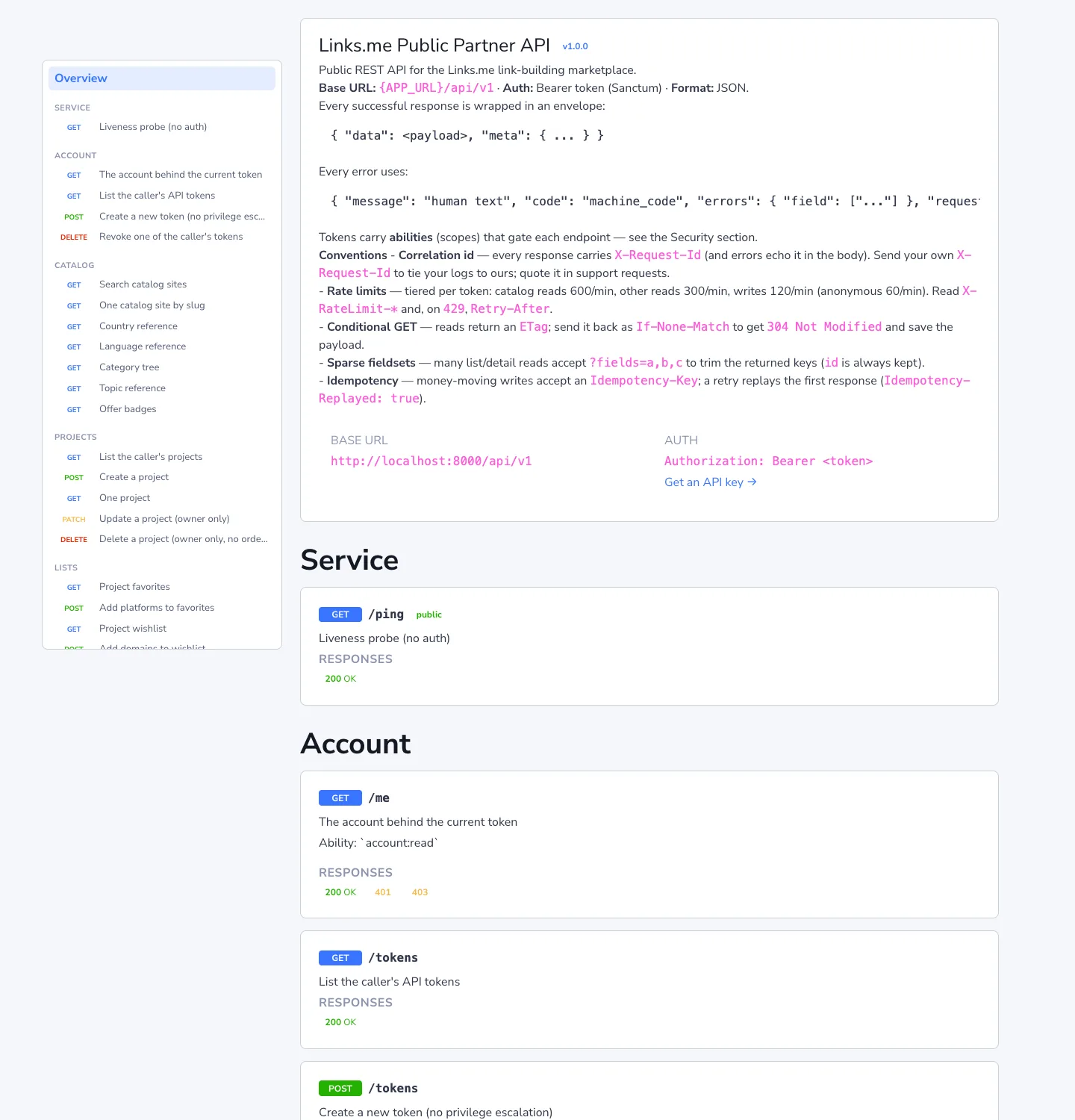
Documentation with live examples: app.links.me/api/docs. The OpenAPI spec is at /api/openapi.yaml — feed it to Postman, Insomnia, or a client generator.
A key in one minute
Profile → API keys (/api-tokens). Name it, tick the permissions, set an expiry — or leave "never" — and press Create key.
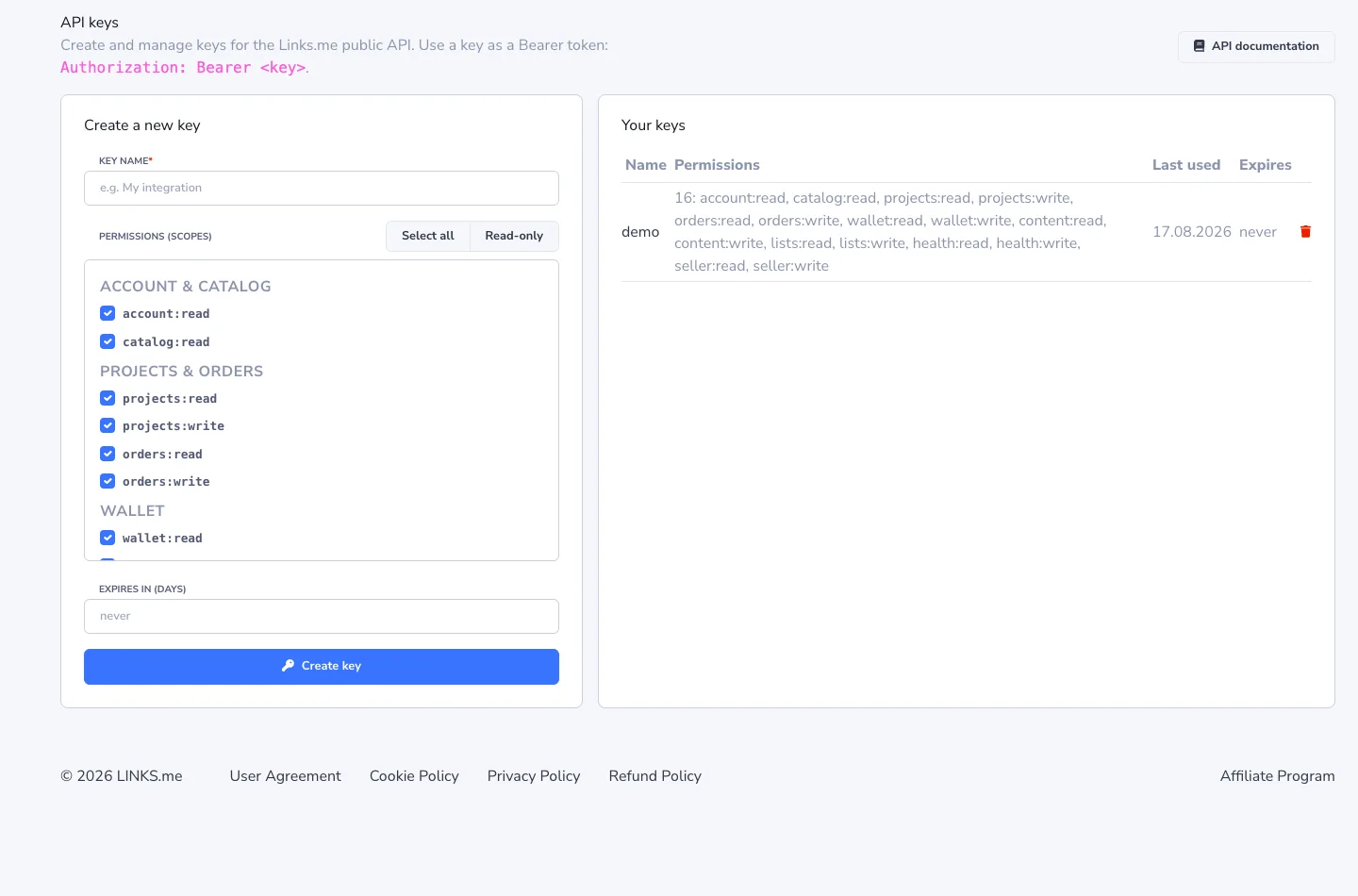
The key is shown once. From then on it's used as a Bearer token:
Authorization: Bearer <key>
Permissions (scopes) are chosen with checkboxes — and this is the main thing to understand about security. A key for a script that only reads the catalog gets a single catalog:read scope and physically cannot place an order or spend money, even if it leaks. The Read-only button ticks every read scope at once.
| Scope | What it opens |
|---|---|
catalog:read |
catalog search and reference data |
projects:read / projects:write |
projects |
orders:read / orders:write |
cart, checkout, confirming and cancelling placements |
wallet:read / wallet:write |
balances, history, deposits, withdrawals, exchange, transfers into a project |
content:read / content:write |
ordering articles, forum, profile, and tier links |
lists:read / lists:write |
Favorites, Wishlist, Stop List |
health:read / health:write |
Health Dashboard |
messages:read / messages:write |
per-order chat with the publisher |
reports:read |
spend and headline KPIs per project |
teams:read / teams:write |
inviting colleagues to a project |
webhooks:read / webhooks:write |
event subscriptions |
billing:read / billing:write |
invoicing details |
Create as many keys as you like; each is revoked on its own without touching the rest.
What a response looks like
Success is always wrapped in data; pagination and currency live in meta:
{ "data": { ... }, "meta": { "pagination": { ... }, "currency": "USD" } }
Errors always have one shape, with a machine code and, for validation, a per-field breakdown:
{ "message": "The given data was invalid.",
  "code": "validation_error",
  "errors": { "target_url": ["The target url field is required."] },
  "request_id": "89d73b2e-…" }
Codes: 401 missing or expired token · 403 scope not granted · 404 not found or not yours · 422 validation error · 429 too many requests.
request_id is in every response (and in the X-Request-Id header). If something goes wrong, send it to support — it locates the request in our logs.
Scenario: from search to placement
The whole buying flow is five requests.
1. Find sites. Prices come back in the currency of the project you pass.
curl "https://app.links.me/api/v1/catalog/platforms?q=marketing&price_max=150&project_id=123" \
  -H "Authorization: Bearer $TOKEN"
For each site: domain, DR, traffic, referring domains, topics, languages, formats with a price for each, available add-on services, insurance.
2. Add to cart.
curl -X POST https://app.links.me/api/v1/projects/123/cart \
  -H "Authorization: Bearer $TOKEN" -H "Content-Type: application/json" \
  -d '{"platform_id": 4521, "type": "guest_posting", "format": "white_niche", "insurance": "6m"}'
type is guest_posting or link_insertion; format is the niche (white_niche, casino, crypto, dating, pharma); insurance is 6 or 12 months; services is an array of add-on service ids; article_id points to a ready article, or send publication_title + publication_text inline.
3. Get the total before paying.
curl https://app.links.me/api/v1/projects/123/cart/estimate -H "Authorization: Bearer $TOKEN"
4. Check out. The money goes into escrow — the publisher receives it only after you confirm.
curl -X POST https://app.links.me/api/v1/projects/123/checkout \
  -H "Authorization: Bearer $TOKEN" -H "Idempotency-Key: order-2026-09-09-001"
5. Track and close. GET /projects/123/orders shows statuses. Once the publisher has posted the material, POST /projects/123/orders/{id}/publish confirms and releases the money; POST …/cancel cancels with a refund.
Chat with the publisher about a specific order is GET/POST /orders/{id}/messages. Anything you'd type in the account can be sent from here.
Health Dashboard via the API
Everything described in the dashboard article is available programmatically.
Add links to monitoring — in bulk, with price, anchor, and tags:
curl -X POST https://app.links.me/api/v1/projects/123/health/monitoring \
  -H "Authorization: Bearer $TOKEN" -H "Content-Type: application/json" \
  -d '{"links": [
        {"source_url": "https://blog.example.com/post", "target_url": "https://mysite.com",
         "anchor_expected": "my brand", "price": 120, "currency": "USD", "tags": ["q3"]}
      ]}'
Read the state — GET /projects/123/health/monitoring: for each link, live/lost, dofollow/nofollow, HTTP code, indexation, donor DR and traffic.
Run checks — POST …/health/monitoring/check (status + indexation, $0.006 per page) and POST …/health/monitoring/ahrefs ($0.04 per site). Both are paid and accept an Idempotency-Key: a retry after a timeout returns the first response instead of charging twice.
Configure auto-updates — PATCH …/health/settings: your site, competitors, auto_status / auto_ahrefs schedules (daily / weekly / monthly), and redirects.
One-off list check — POST …/health/checks with target_url and source_urls[], free, up to 5,000 addresses; results via GET …/health/checks.
Webhooks instead of polling
No need to hit GET /orders every five minutes. Subscribe to events and we POST to your URL:
| Event | When |
|---|---|
order.created |
you placed an order |
order.status_changed |
the publisher accepted, posted, or rejected; you confirmed or cancelled |
content.status_changed |
movement on an article or link-service order |
monitoring.check_completed |
a backlink check finished |
message.created |
the publisher wrote in the chat |
curl -X POST https://app.links.me/api/v1/webhooks \
  -H "Authorization: Bearer $TOKEN" -H "Content-Type: application/json" \
  -d '{"url": "https://you.example/hooks/linksme", "events": ["order.status_changed", "message.created"]}'
The response includes a secret, also shown once. Every delivery is signed with HMAC-SHA256 in the X-Webhook-Signature header; verify the signature before trusting the body. Reply 2xx to acknowledge; otherwise we retry with growing back-off. POST /webhooks/{id}/ping sends a test event, and GET /webhooks/{id}/deliveries shows the attempt history with your server's response codes — handy when "nothing arrives".
Small things that save time
- Rate limits: catalog reads 600 requests per minute, other reads 300, writes 120. On
429, honorRetry-After. ?fields=id,domain,dr,price— return only the fields you need; lighter responses.ETag/If-None-Match— if nothing changed, you get a304with no body.X-Request-Id— send your own and it comes back in the response; useful for stitching logs.- Currency — a project has one: USD or EUR. The catalog prices in the currency of the
project_idyou pass. - Team access —
POST /projects/{id}/accesswith a colleague's email; they accept viaPOST /access/invitations/{id}/acceptand get the same rights as in the account.
Where to start
- Create a key in Profile → API keys — Read-only is enough for a first look.
GET /api/v1/me— confirm the token works and see its scopes.GET /api/v1/projectsandGET /api/v1/wallets— your projects and balances.- Open api/docs — every endpoint with parameters, examples, and response codes.
Partners who need a key with extended scopes, or help with an integration, — contact support.
 ChatGPT
 Perplexity
 Claude
 Google AI Mode
 Grok
Grok